Petpooja is a broad, established restaurant platform. TableFlows is a flexible restaurant POS and management software that keeps billing, orders, tables, QR menus, KOT, waiter requests and hotel room booking in one dashboard, priced per table. This page shows what you get, what you do not, and who each kind of tool suits.
Orders, sales, customers, waiter requests and hotel rooms in one place.
Pay for the tables you have, from ₹39 per table per month. See pricing.
Guests order from the table with no app. See QR code ordering.
Add your menu and tables and begin. Start with a free 10-day trial.
Restaurant owners need different things. Some need ingredient-level inventory, others want easy billing, QR ordering and table control at a price that follows their size. Whatever you compare, check these.
The left column is what TableFlows does today, including what it does not do. We do not list another vendor's features, because they change. Use the right column as your question list when you ask Petpooja, or any other vendor, for a demo.
| Feature | TableFlows | Petpooja (confirm with them) |
|---|---|---|
| POS and billing | Yes: tax, service charge, discount, part payments and a thermal bill | Ask what is in your plan and what costs extra |
| Order management | Yes: QR orders and staff-entered orders in one live list | Ask how orders from each source arrive |
| KOT | Yes: printable KOT, with a revised ticket when an order changes | Ask about ticket format and printers |
| Table management | Yes: a live floor view and table sessions | Ask how tables and bills are linked |
| QR menu and ordering | Yes: a code per table, no app for guests | Ask whether guests need an app |
| Waiter calls | Yes: Call Waiter and Request Bill, with a sound and table number | Ask whether guests can call from their phone |
| Reports | Yes: sales and popular items by date range | Ask which reports your plan includes |
| Staff roles | Yes: owner, manager, waiter, kitchen and cashier | Ask how access is set per role |
| Hotel room booking | Yes: an optional module the owner switches on | Ask whether room booking is offered |
| Online payments | Cash, UPI, card and online gateways recorded on the bill | Ask which gateways are supported |
| Ingredient inventory | Not included; sales reports help you plan | Ask what stock control is built in |
| Delivery app integrations | Not included | Ask which platforms connect and at what cost |
| Multi-outlet | Not included | Ask how several outlets are managed |
| Pricing | Per table per month, from ₹39 | Ask whether pricing is per terminal, outlet or module |
Product names are trademarks of their respective owners and TableFlows is not affiliated with them. We describe other products only in general terms, and they change often, so confirm current features and pricing on the vendor's own website (petpooja.com for Petpooja) and in a demo.
These are TableFlows screens, not another product's. They show the pages your team works in every day.
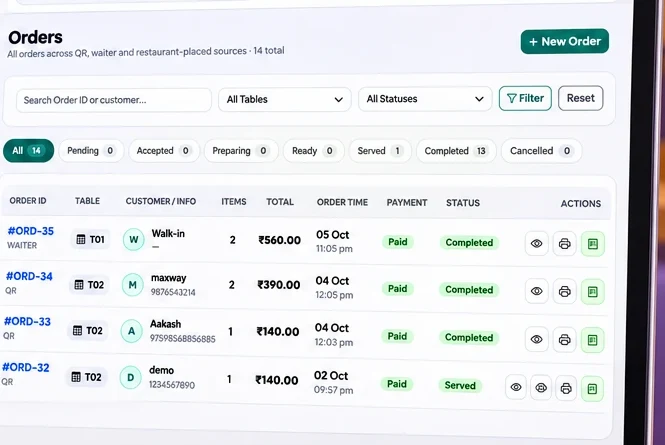
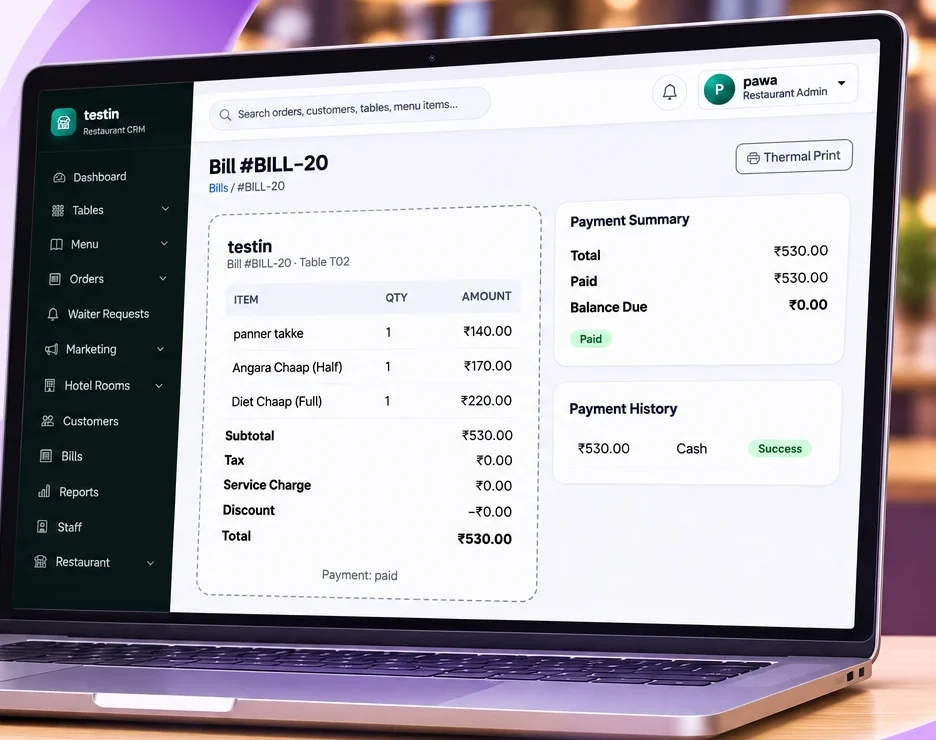
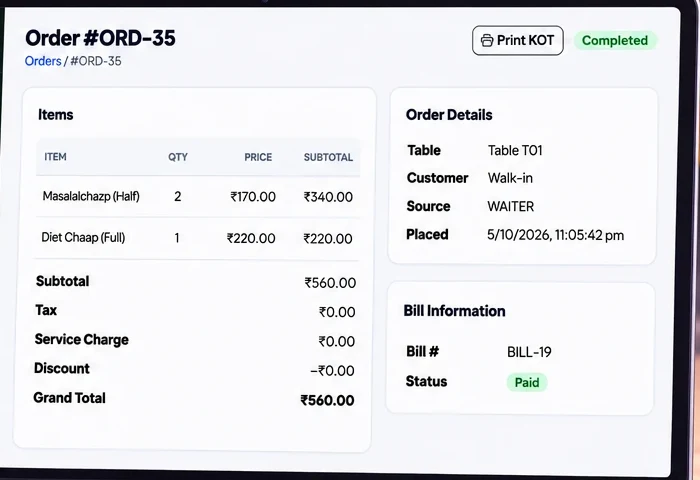
Eight things TableFlows does well, and none of them need extra hardware.
Both are restaurant management tools. The right one depends on how you work, so here is a plain split.
TableFlows is not trying to be everything. Compare plans, ask for a demo with your own menu, and then decide.
Many owners search for Petpooja price first. We do not quote it, because plans, modules and offers change and we would not want to give you an out-of-date number. Ask Petpooja for a written quote that lists every module, device and add-on you need, and put it next to TableFlows's per-table price on the pricing page. Then run both on the same menu.
It suits any food or hospitality business where guests sit at tables.
You do not have to switch in one night. A staged move keeps the restaurant running while the team gets comfortable.
Import it from Excel or a photo in menu management, then check every price.
Put QR codes on a few tables and keep your current system for the rest.
Print tickets and bills from TableFlows once orders flow well.
When the team trusts the new flow, move the remaining tables.
Keep your old records for tax and audit purposes.
A demo with a sample menu proves little. Ask to run your own menu and your own scenarios.
It depends on your restaurant. TableFlows is worth a look if you want billing, QR menus, table management, KOT, waiter requests and optional hotel room booking in one per-table plan. If you need ingredient inventory, delivery integrations or multi-outlet control, a broader platform may suit you better.
Both are restaurant POS and management tools with billing, orders, tables and kitchen tickets. TableFlows is narrower: it focuses on dine-in service and is priced per table.
It can be if you run a dine-in restaurant and want QR ordering, KOT and billing. It does not cover delivery integrations, ingredient inventory or multi-outlet management.
Yes. It supports bills with tax, service charge and discount, payment tracking including part payments, and thermal bill printing.
Yes. Each table has its own QR code, and guests browse your photo menu and order from their phone with no app.
Yes. It prints a kitchen ticket with the table, items and guest notes, and a revised ticket when an order changes.
Yes. Guests tap Call Waiter or Request Bill on their phone, and staff see a table-wise request with a sound while the panel is open. See the waiter call system.
Yes. Hotel room booking is an optional module the owner switches on, so a hotel can manage rooms next to its restaurant.
TableFlows is per table from ₹39 per table per month. We do not quote other vendors' prices because they change; ask them for a current quote.
Start with a free 10-day trial. You can test with your real menu on a few tables.
You can import your menu from an Excel file or a photo in menu management, then check the prices and veg markers. There is no automatic import from other vendors' systems.
Keep exploring how TableFlows works for restaurants like yours.
Start your free 10-day trial. Your account is active right away, and no payment is needed to begin.
Start Free 10-Day TrialShare your details and our team will contact you about TableFlows.
