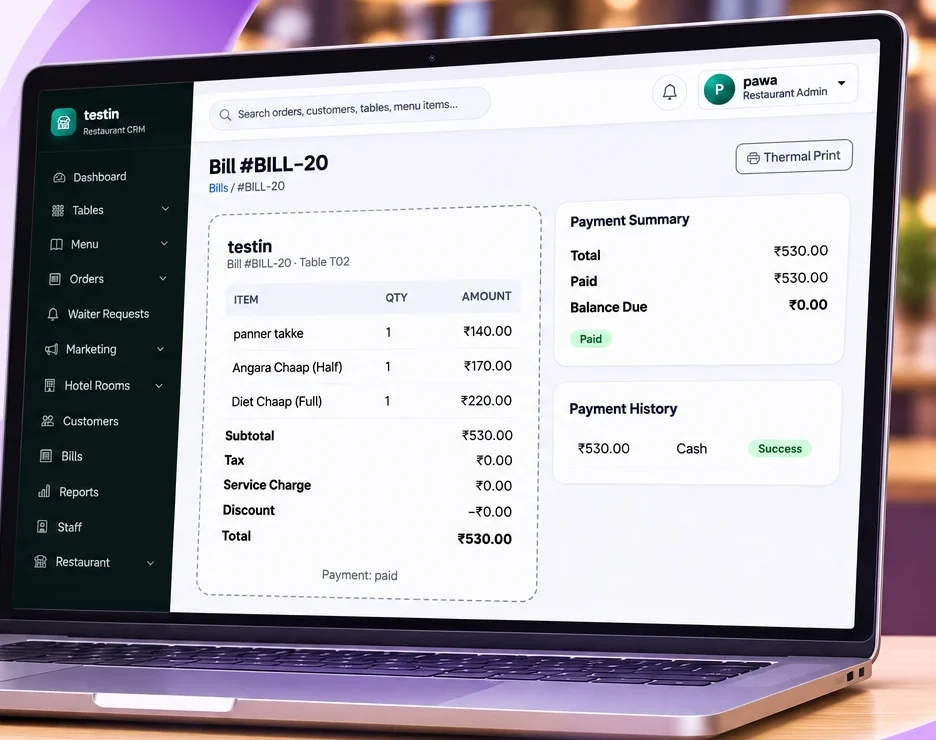
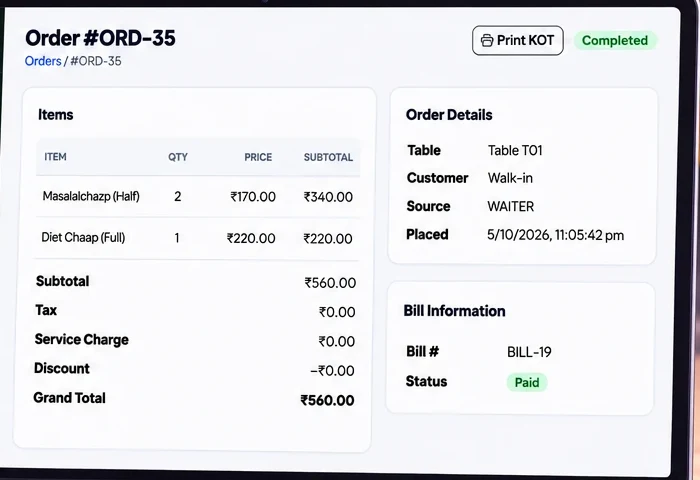
QR Code Ordering System for Restaurants | TableFlows
QR code ordering system

QR Code Ordering System for Restaurants

Put a unique QR code on every table. Guests scan it with the phone camera, browse your menu and place orders in seconds, with no app to download and no waiting to catch a waiter. Every order reaches your staff live, and the table gets one combined bill.

  • No app for customers
  • Live order alerts
  • One bill per table

Get a free callback

Share your details and our team will contact you about TableFlows for your restaurant.

We only use your details to contact you about TableFlows.

What you get

Scan and order

The menu opens in the phone browser the moment a guest scans. They add items, write notes such as less spicy, and send the order.

Orders reach staff instantly

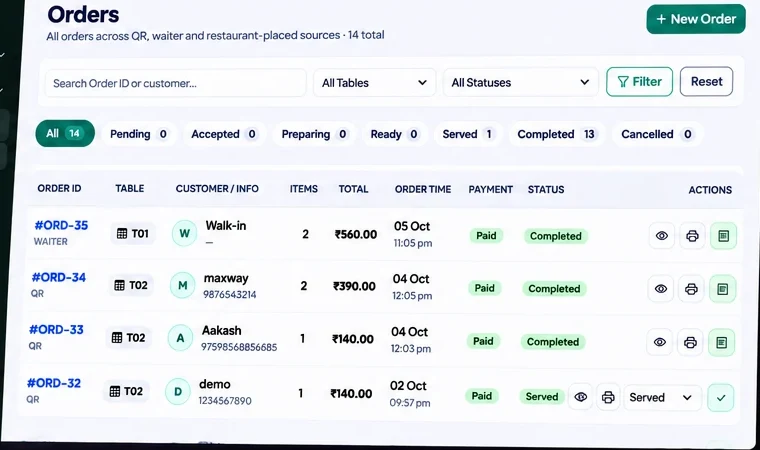
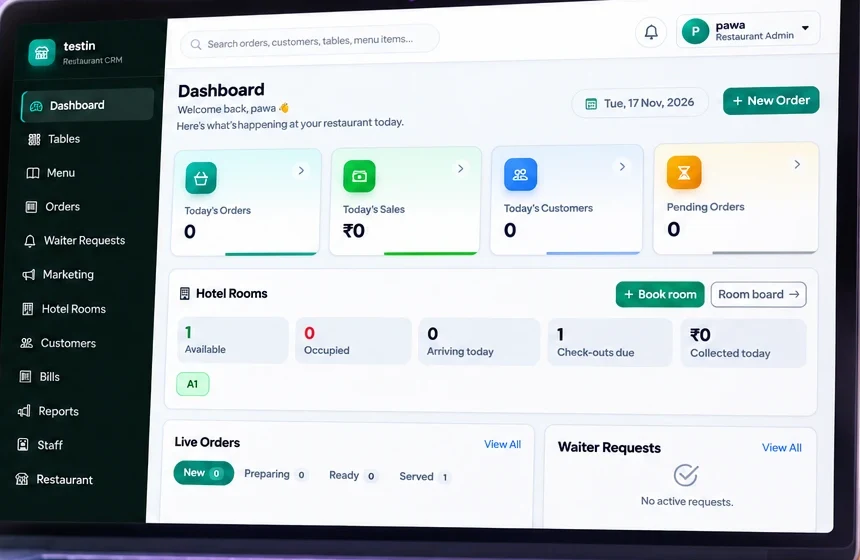
New orders appear on the restaurant dashboard with a sound alert, so nothing sits unnoticed. See order management.

Order again, same bill

Guests can order more any time. Every round joins the same table session and lands on one final bill.

A secure code for each table

Each table has its own QR code. If one is ever misused, you can regenerate it in one click.
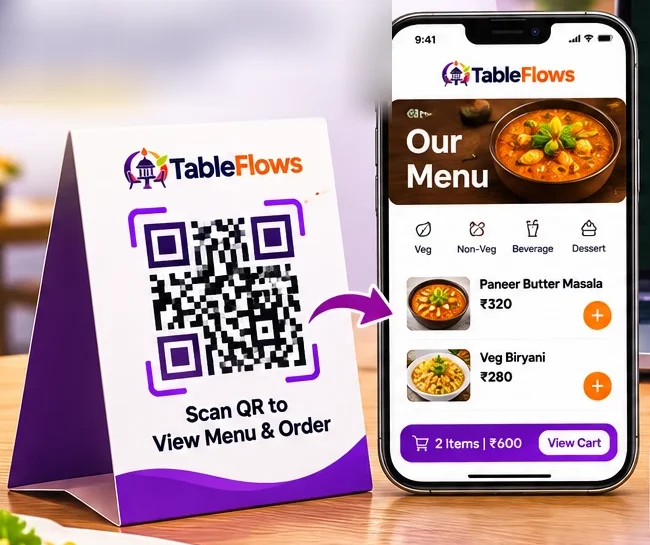
A table stand with a TableFlows QR code that says Scan QR to View Menu and Order, beside a phone showing a photo menu and a cart with two items.

What is a QR code ordering system?

A QR code ordering system lets guests order food by scanning a QR code with their phone. Each table has its own code, linked to your digital menu, so the order always knows which table it came from.

In TableFlows the guest never creates an account or installs anything. After scanning, they can:

  • View your digital menu and browse categories
  • See food photos, veg or non-veg markers and prices
  • Add items to a cart and change quantities
  • Write a note such as less spicy
  • Place the order, then order again later
  • Call a waiter or ask for the bill

Features of TableFlows QR ordering software

Ten things that take an order from a guest's phone to the kitchen and the bill.

Scan and order food

Guests scan the code on their table and the menu opens in the phone browser, ready to order.

Table-wise QR codes

Every table has its own code, so each order carries its table. Regenerate a code in one click if it is misused.

A digital restaurant menu

Names, photos, descriptions, veg and non-veg markers, prices and categories. See the digital menu.

Menu categories

Group dishes the way your guests look for them, such as starters, main course, breads, beverages and desserts.

Cart, quantities and notes

Guests pick several items, change quantities, add a note and review the cart before sending.

Real-time order management

Orders appear on the Orders page with an alert and sound, with table, customer, items and status. See order management.

KOT for the kitchen

Print a kitchen ticket with the table, items and notes. See KOT software.

Billing integration

Every round joins the table session and lands on one bill. See restaurant billing software.

Easy menu updates

Change a price, edit a description or switch off a sold-out dish, and the live menu updates at once.

Waiter call and bill request

The same screen lets guests call a waiter or ask for the bill. See the waiter call system.

QR order management in the real dashboard

Here is what your team sees after guests start ordering. These are TableFlows screens, not mock-ups of another product.
How a QR code ordering system works

Eight steps from setup to the kitchen. You can be ready for a first service in an afternoon.

  1. Step 1

    Set up your restaurant

    Create your profile and add your restaurant details. Start with a free 10-day trial.

  2. Step 2

    Add your food items

    Enter names, prices, descriptions, photos and categories, or import a menu from Excel or a photo.

  3. Step 3

    Generate table QR codes

    Add each table and create its QR code from the dashboard.

  4. Step 4

    Place the codes on tables

    Print them on table stands, stickers or cards, and write the table number beside each.

  5. Step 5

    Guests scan and browse

    They scan with the phone camera and your menu opens in the browser.

  6. Step 6

    Guests place orders

    They add items to the cart, add notes and send the order.

  7. Step 7

    You receive the order

    It appears on the Orders page with the table number and a sound alert.

  8. Step 8

    The kitchen prepares it

    Print the KOT, cook, and move the order from preparing to ready to served.
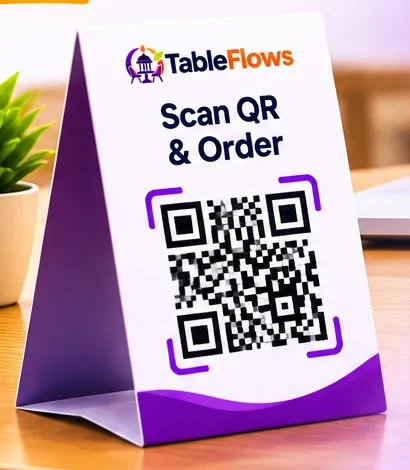
A purple and white table tent with a TableFlows logo and a QR code that says Scan QR and Order, on a restaurant table.

A QR code for every table

A single code on a poster only opens a menu. A code on each table also tells your team where the order came from, so waiters carry food to the right place and every round lands on the right bill.

  • One code per table, from the QR management page
  • Print it on a table tent, sticker or card
  • Regenerate a code in one click if it is ever misused
  • Add a short line such as Scan to order so guests know what to do

Need only a code for an existing menu link? Try the free QR menu generator.

QR ordering compared with a paper menu and an order pad

Most restaurants start from the same place: a printed menu and a waiter with a pad. Here is what changes.

With QR code ordering

  • Guests order when they are ready, without catching a waiter's eye.
  • Items, quantities and notes come from your menu, so nothing is misheard.
  • The order reaches the kitchen the moment it is sent, with a printable KOT.
  • Every round joins one bill per table.
  • Prices and dishes change in the dashboard, with no reprint.

With a paper menu and an order pad

  • A waiter must be free to take the order, which is slow at peak time.
  • Handwriting and shouted orders can be misread.
  • Orders are carried to the kitchen on slips or by word of mouth.
  • The bill is added up by hand from several slips.
  • Every price change means a reprint.

Where QR code ordering pays off first

Owners usually notice the benefit in the same three places. None of them need a big change to how you run the floor.

Rush hours

At lunch and dinner peaks the slowest step is getting an order taken. When guests send their own order, a full room does not mean a queue of waiting hands.

Large groups

Big tables order in rounds. Everyone adds to the same table session, so staff are not writing five separate chits or merging bills later.

Understaffed shifts

On a quiet weekday with fewer waiters, guests can still order and ask for the bill without waiting for someone to be free.

QR code ordering for different kinds of food business

It works for any dine-in place where guests sit at tables.

Restaurants

Dine-in guests scan, browse and order without waiting for traditional order-taking. See small restaurant software.

Cafes

Coffee, tea, snacks and desserts ordered from the table. See cafe software.

Hotels

Digital ordering for the hotel restaurant and dining areas. See hotel restaurant software.

Fast food restaurants

Burgers, pizzas, sandwiches and snacks, ordered quickly. See QSR software.

Food courts

Guests browse food options and order through digital menus. See food court software.

Cloud kitchens

A clear digital menu and orders organised for the kitchen. See cloud kitchen software.

Built for the way tables actually work

Most real dining is not one order per table. People start with starters, add mains, then order dessert. TableFlows is built around a table session, so every round stays together instead of becoming separate bills your cashier has to merge.

When guests are done they can ask for the bill with one tap, and your staff generate a single bill with every order on it. Payment can be cash, card or UPI at the table, or online through the payment gateways you enable.

A QR ordering system for India: what matters locally

Guests range from first-time phone users to people who order food on their phone daily, so the flow has to be simple and your staff must remain able to help. With TableFlows, staff can place an order for a guest from the restaurant panel, so a guest who prefers to speak to a person still gets served, and the order lands in the same table session.

  • Veg and non-veg markers and clear prices appear on every item, which suits family tables with mixed preferences.
  • UPI, cash and card can be recorded at the counter, and guests can pay online if you enable it.
  • A tent card that says scan to order is clearer than a long instruction.
  • No app to download, so walk-in guests can order straight away.
Checklist

Checklist before your first QR service

A few checks prevent most first-night problems.

  1. 1Every QR code is scanned with at least two different phones.
  2. 2Table numbers are written clearly beside each code.
  3. 3Prices, veg and non-veg markers and photos are checked in the menu.
  4. 4The kitchen printer has paper and a test ticket has printed.
  5. 5A few printed menus and an order pad are kept as a backup.
  6. 6Each waiter knows how to enter an order for a guest who prefers to talk to someone.

QR code ordering with a complete restaurant management system

TableFlows is more than a QR ordering system. The same account runs the rest of the restaurant:

Frequently asked questions

What is a QR code ordering system?

It lets restaurant guests scan a QR code with their phone, view a digital menu, select dishes and submit an order, with each table having its own code.

How does QR code food ordering work?

You place a QR code on each table. Guests scan it, browse the menu, add items to the cart and send the order, and your staff see it live with the table number.

Do my customers need to download an app?

No. The menu opens in the normal phone browser as soon as they scan the table QR code. Nothing to install and no account to create.

Can customers order more than once during a visit?

Yes. Every order placed while the table session is open joins the same session, so the final bill includes everything.

Can I generate a separate QR code for each table?

Yes. Each table has its own code, so the order carries its table. You can regenerate a table's code in one click.

Does QR ordering connect to billing?

Yes. Orders join the table session and roll into one bill, where you record payments. See restaurant billing software.

Does TableFlows support KOT printing?

Yes. It prints a kitchen ticket with the table, items and guest notes, and a revised ticket when an order changes.

Can I update prices after printing the QR codes?

Yes. The codes point to your live menu, so you edit prices and dishes in the dashboard and the printed codes keep working.

How much does a QR ordering system cost?

TableFlows is priced per table per month, starting from ₹39 per table, and the price per table drops on larger plans. See the pricing page. Start with a free 10-day trial.

Does it replace my waiters?

No. It removes the wait for taking orders, so waiters spend time serving. Guests can still call a waiter with one tap when they need help.

Is QR code ordering safe for guests?

Guests only open your menu page in the browser. They do not install anything or share card details with us to place a dine-in order, and each table has its own code that you can regenerate.

What do I need to print?

One QR code per table, from the QR management page. Place it on a table tent or sticker with a short instruction such as Scan to order.

Is it suitable for small restaurants?

Yes. Pricing is per table, so a small restaurant or cafe starts with only the tables it has.

Ready to try TableFlows?

Start your free 10-day trial. Your account is active right away, and no payment is needed to begin.

Start Free 10-Day Trial
Call WhatsApp