TableFlows connects the parts of a dine-in restaurant that usually live in different places: the menu, the table, the kitchen, the bill and the numbers. It runs in the cloud, so you manage it from any phone, tablet or computer, and every guest order flows from the table QR code to the final report without being written twice.
Guests order from a QR code on the table. See QR code ordering.
Live orders and printable KOT tickets keep the kitchen in sync.
One bill per table with tax and service charge, plus payments by cash, card, UPI or online.
Sales, popular items and customers in reports.
A restaurant management system should follow an order from the moment a guest sits down to the moment the table is clear. TableFlows does that for dine-in service, and it keeps the data in one place, so the bill matches the order and the report matches the bill.
| Area | What TableFlows does |
|---|---|
| Menu | Categories, items, photos, half and full prices; import from Excel or a photo (menu management) |
| Tables | Floor view, QR code per table, sessions (table management) |
| Orders | Live list, statuses and KOT (order management) |
| Billing | Combined bill, tax, service charge, payments (billing) |
| Customers | Customer list, feedback and Google review QR (CRM) |
| Team | Roles for owner, manager, waiter, kitchen and cashier (staff app) |
The easiest way to understand a restaurant management system is to follow a single order through it. Here is a typical dinner for one table in TableFlows.
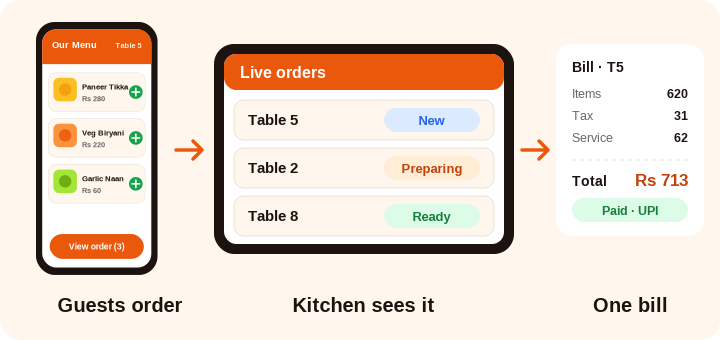
Each person in the restaurant touches a different part of the system. Here is what each one gets.
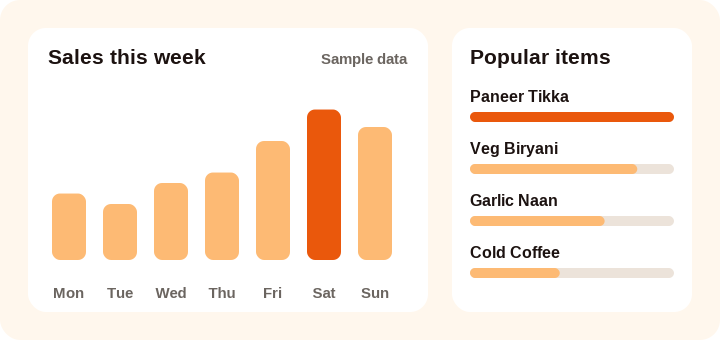
TableFlows is made for places where guests sit at tables and order in rounds. Whether you serve ten tables or thirty, the flow is the same, and the price follows your table count.
Many restaurants run on a billing book, a spreadsheet and a menu PDF. Each works alone, but they do not talk to each other. The comparison below shows where the cost of that shows up.
| Separate tools and paper | One restaurant management system | |
|---|---|---|
| Taking an order | Written by hand, then re-entered | Entered once by the guest or the waiter |
| Kitchen ticket | Handwritten, easy to misread | Printed from the order with notes |
| Bill at the end | Added up by hand from slips | Built from every round automatically |
| Menu changes | Reprint cards and update each file | Edit once, live for the next guest |
| Sales numbers | Collected at night from a book | Ready in reports any time |
Use this checklist with any vendor, including us. Test each point with your own menu during a trial, not a demo.
Cloud based restaurant software changes a few things you may be used to. There is no server in the back office to look after, no installation on each computer and no manual updates. Your data is stored online, so a broken tablet does not mean lost orders.
Switching systems is easier in small steps. Keep your old process running in parallel for the first few days, and retire it only when the team trusts the new flow.
Add your menu and tables first, and check every price.
Switch on QR ordering for a few tables during a quiet week.
Bring in KOT printing and billing once orders flow smoothly.
When the team trusts the new flow, stop the old process.
See QR code ordering and menu management for the details.
Register your restaurant and choose a plan by the number of tables.
Type it in, or import from Excel or a photo. Check prices and veg markers.
Create each table, print its code and scan every one with a phone.
Five minutes on orders, waiter calls and bills, then start with a few tables.
The price per table drops as you add more tables. These are the live plan prices.
Software that brings together ordering, the kitchen, billing and reporting for a restaurant, so staff and owners work from one set of data.
The best one is the one that fits how you serve. If guests sit at tables and order in rounds, look for QR ordering, kitchen tickets, a bill per table and simple reports, at a price that follows your table count. Test it with your own menu before you commit.
No. It runs in the browser, with an optional Android app for staff.
Any phone, tablet or computer with a browser. Guests use the camera on their own phone, and staff can use the Android app or the browser.
No. TableFlows covers ordering, tickets, billing and reports, not stock control. The popular items report helps you plan purchases. See inventory.
From ₹39 per table per month. See pricing.
TableFlows needs a connection to take live orders. Keep a paper backup for outages, and enter any missed orders afterwards from the restaurant panel.
Your restaurant data is stored on our servers and each restaurant can only see its own data. For specific questions about backups and data handling, please use the contact page.
Keep exploring how TableFlows works for restaurants like yours.
Start your free 10-day trial. Your account is active right away, and no payment is needed to begin.
Start Free 10-Day TrialShare your details and our team will contact you about TableFlows.
