Guests should never have to wave or shout to get attention. With TableFlows, scanning the table QR code also gives them a Call Waiter button. One tap and your staff see exactly which table needs help, with a visual alert and a sound, on a dashboard that tracks every request.
A Call Waiter button sits right on the guest's menu screen, ready when they need it.
Staff see the exact table that called, so nobody walks the floor looking.
A notification and a short repeating beep play in the restaurant panel as soon as a guest calls.
While a call is active for a table, repeated taps do not flood your staff with duplicate alerts.
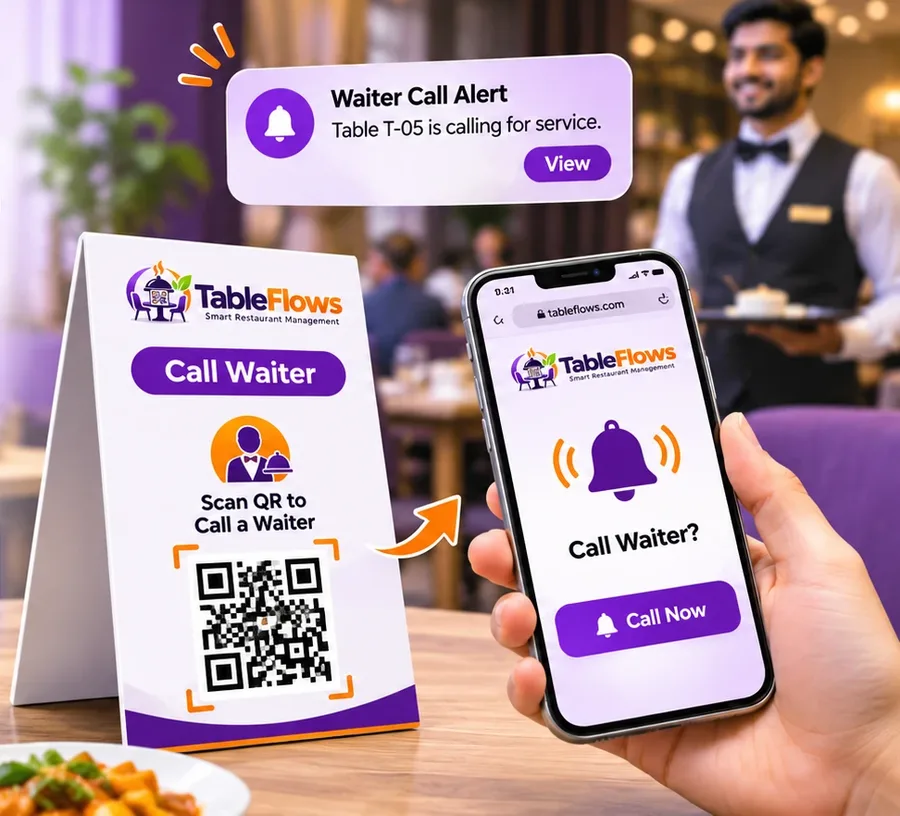
A waiter call system lets guests ask for service from their table without raising a hand or chasing a waiter. The guest sends a request, and the restaurant's staff see which table sent it.
In TableFlows the request starts from the same table QR code guests use for the menu. They scan it, tap Call Waiter, and the request lands on your Waiter Requests page with the table number.
Eight things that make a call easy for guests and easy to answer for staff.
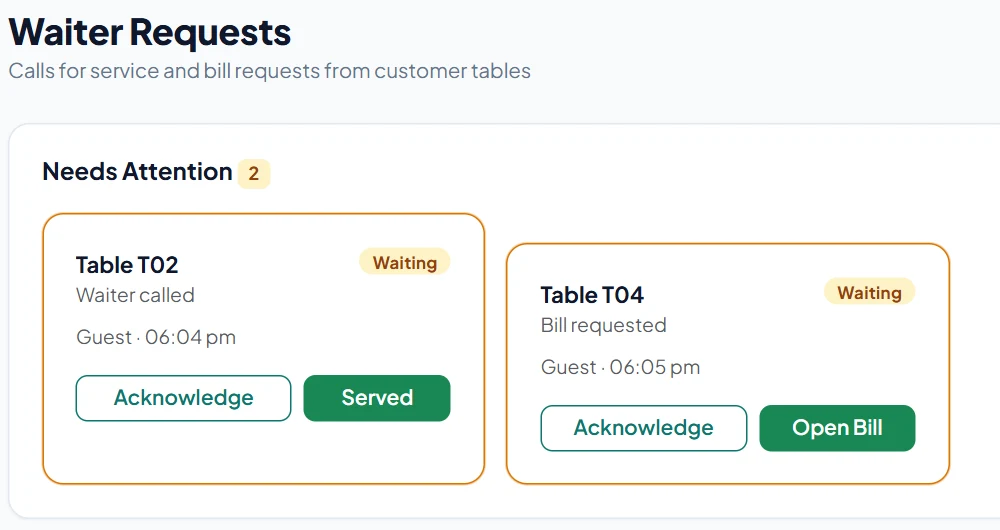
The Waiter Requests page is where your team works. Open requests sit at the top, and the history below shows what was asked and when.
Six steps from setup to a happy table.
Add each table in the restaurant panel. See table management.
Each table gets its own code, so a request always carries the right table.
They scan the code and tap the button on the menu screen.
The request appears with the table number, a message and a sound.
The nearest waiter taps Acknowledge so no one else walks over.
Tap Served when done. The request leaves the Needs Attention list.

A guest who can ask for help in one tap stops waiting for eye contact, and your waiters stop scanning the room. Calls arrive as a list rather than a guess.
Any place where guests sit at tables and staff walk the floor.
Both get a waiter to the table. The difference is how much your team has to watch for it.
Wireless call buttons work, but they are extra hardware per table that can be lost, run out of battery or break. A phone-based waiter call system uses what the guest already has. The button is part of the same screen they use to order, so it is always one tap away.
| Wireless call bell | TableFlows waiter call | |
|---|---|---|
| Hardware per table | A button and a receiver | None; a QR code on the table |
| Staff see which table | Depends on the model | Always, with the table number |
| Cost to add a table | Another device | Just another table on your plan |
| Extra uses | Calling only | Same screen also orders and asks for the bill |
Based on how basic wireless call bells typically work. Specific models vary.
A system fails when staff stop trusting it. Alerts that fire constantly, or that do not say which table, get ignored. TableFlows keeps the signal clean.
A call button only helps if someone is watching for it.
TableFlows is more than a call button. The same account runs the rest of the dine-in flow:
It is a digital way for guests to ask for a waiter from their table. The restaurant's staff get the request with the table number.
They scan the table QR code and tap the Call Waiter button on the menu screen. Your staff get an alert with the table number.
Yes. While the restaurant panel is open, a notification and a short repeating beep (up to five seconds) play for each new request. You can switch the sound off in Settings. Alerts play while the panel or app is open; push alerts for a closed app are not available yet.
Yes. Every request shows its table number, and the history lists the table and time.
The beep stops when someone acknowledges or serves the request, and it stops by itself after about five seconds. You can also turn the notification sound off in Settings.
No. While a request for that table is already active, duplicate calls are prevented.
No. Anyone who scans the table code can use the Call Waiter button.
Yes. You pay per table, so a small restaurant or cafe starts with only the tables it has.
Yes. The Call Waiter button is on the same screen as the menu and ordering, so guests use one page for everything.
No call bells or receivers. You need the printed QR codes on your tables and a phone, tablet or computer signed in to the restaurant panel.
It is part of the TableFlows plan, which is priced from ₹39 per table per month. Start with a free 10-day trial.
Keep exploring how TableFlows works for restaurants like yours.
Start your free 10-day trial. Your account is active right away, and no payment is needed to begin.
Start Free 10-Day TrialShare your details and our team will contact you about TableFlows.
